

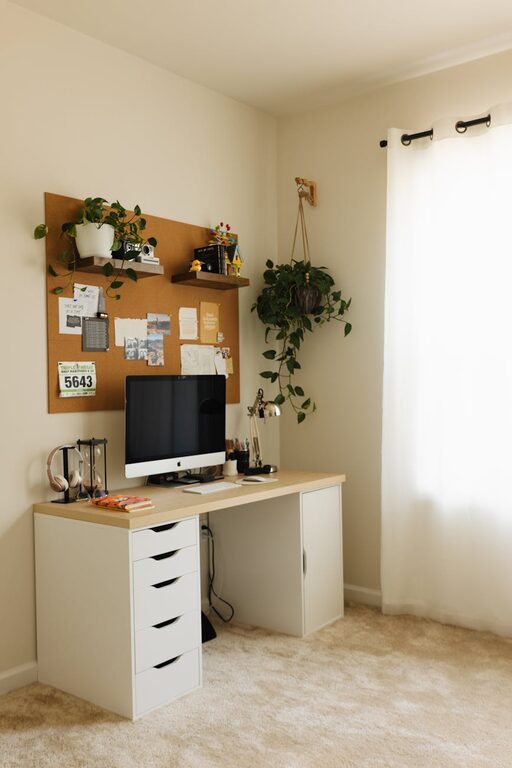
Working from home has become a norm for many people, making it essential to have a workspace that supports both comfort and productivity. Whether you have a dedicated room or just a small corner, creating a cozy and efficient environment can make your workday more enjoyable and effective. Below are helpful tips to guide you in designing a home workspace that feels inviting yet professional.
Choose the Right Location
The foundation of any good workspace is its location. Consider the following when selecting your spot:
– Natural Light: Position your desk near a window if possible. Natural light improves mood and reduces eye strain.
– Quiet Area: Find a space with minimal distractions and noise for better concentration.
– Separate from Leisure Zones: Avoid working from your bed or couch where you relax to help maintain clear boundaries between work and rest.
Invest in Comfortable Furniture
Comfort influences how long you can focus and how you feel throughout the day.
– Ergonomic Chair: Choose a chair that supports your lower back and allows your feet to rest flat on the floor.
– Adjustable Desk: A desk at the right height prevents strain on your wrists and shoulders. Consider standing desks if you want the option to alternate between sitting and standing.
– Desk Size: Ensure your desk has enough space for your computer, notes, and other essentials without feeling cramped.
Organize Your Space Efficiently
A clutter-free desk helps reduce stress and increases productivity.
– Use Storage Solutions: Shelves, drawers, and organizers keep supplies within reach but out of the way.
– Cable Management: Tame wires with clips and sleeves to avoid tangles and visual distraction.
– Minimal Decor: Keep decorations simple and meaningful to avoid overcrowding your space.
Control Lighting and Temperature
Lighting and temperature directly affect your comfort and alertness.
– Task Lighting: Use adjustable desk lamps to provide sufficient light for reading and writing.
– Ambient Light: Soft overhead lighting creates a balanced atmosphere without harsh glare.
– Temperature: Keep the room at a comfortable temperature, ideally between 68°F and 72°F (20°C-22°C), to avoid discomfort.
Personalize Your Workspace
Adding personal touches makes your workspace inviting and boosts motivation.
– Add Plants: Greenery improves air quality and contributes to a calm environment.
– Inspirational Items: Photos, quotes, or art that inspire you can help maintain a positive mood.
– Comfort Items: A cozy blanket or a cushion can add warmth on colder days.
Establish Work Habits to Stay Productive
Your environment matters, but your work habits are just as important.
– Set Boundaries: Define your work hours and communicate them to family members to minimize interruptions.
– Take Breaks: Regular pauses refresh your mind and prevent burnout.
– Organize Tasks: Use a planner or digital tools to prioritize and review your to-do list daily.
Minimize Distractions
Keep focus by managing common distractions:
– Turn Off Notifications: Silence non-essential alerts on your devices during work periods.
– Use Headphones: Noise-cancelling headphones can block out background noise and help you concentrate.
– Dedicated Work Devices: If possible, use separate devices for work and personal activities.
Maintain Your Workspace Daily
A tidy space is easier to work in and maintain.
– End-of-Day Clean Up: Spend a few minutes organizing your desk and files.
– Weekly Review: Occasionally reassess your setup to see if adjustments are needed.
—
Creating a cozy and productive home workspace is about balancing comfort with focus. By thoughtfully choosing your location, investing in quality furniture, organizing efficiently, and cultivating good work habits, you can build an environment that supports your best work every day. Remember that your workspace will evolve, so be open to making changes that suit your needs as they grow.